
Quick answer: To make an anime-style opening song with AI, open Tunora, switch to Custom mode, paste lyrics arranged as Intro → Verse → Pre-Chorus → Chorus → Outro, describe the sound in the style box (for example "shonen anime opening, fast J-rock, driving guitars, soaring vocals"), set the length to about 90 seconds, and generate. Each generation returns two different takes in under two minutes, and you can download the one you like as an MP3. New accounts get enough free credits for one generation, with no credit card.
Every anime fan has hummed an opening they wished existed: a theme for their Discord crew, their tabletop campaign, their original character, or the fan game they keep promising to finish. Until recently that meant finding a musician, a singer and a mixing engineer, or settling for royalty-free stock music that sounds like a dentist's waiting room.
AI music generators changed that. This guide walks through the whole process with Tunora, an AI song generator that writes, sings and produces full tracks from a text description. You will learn what actually makes an anime opening sound like an anime opening, how to translate that into prompts and lyric tags, and which rules to follow so your song stays yours.
What you'll learn:
- What Tunora is and what each of its tools does
- The anatomy of a TV-size anime opening, mapped to song-structure tags
- A six-step walkthrough from idea to downloaded MP3
- Eight copy-paste style prompts for openings, endings, battle themes and more
- What the free plan covers, what the paid plans add, and the copyright rules for fan songs
What Is Tunora?
Tunora is a browser-based AI music generator. You describe a song in a sentence, or paste your own lyrics, and it composes the music, sings the vocals and produces a finished track. Every generation returns two different versions of the song, so you can pick the better take instead of re-rolling blindly. It runs entirely in the browser, needs no music theory, and starts with free credits for new accounts.
The site bundles several tools under one account:
| Tool | What it does | Best for |
|---|---|---|
| AI Song Generator | Turns a description or your own lyrics into a full vocal song | Openings, endings, character songs |
| Instrumental Music Generator | Same engine with vocals switched off | Battle BGM, fan-game music, stream backgrounds |
| AI Lyrics Generator | Drafts verses and choruses for 1 credit per run | Getting past the blank page |
| AI Rap Lyrics Generator | Writes rap verses and hooks | Rap-rock openings, hype tracks |
| Explore | A public feed of songs other users made | Finding style ideas that already work |
Under the hood you choose between three models: V6 for the best quality, V6 Wild for experimental genre blends, and V6 Mini for fast drafts. All three cost the same per generation, which matters more than it sounds: anime openings are often genre mashups (rock plus orchestra plus electronic), and V6 Wild exists for exactly that kind of request.
What Makes an Anime Opening Sound Like One
If you prompt any AI music tool with just "anime opening," you will get something vaguely upbeat and generic. The difference between "generic" and "this could air on Sunday morning" comes from a handful of conventions that Japanese anime openings share. Bake them into your prompt and your lyrics, and the result changes dramatically.
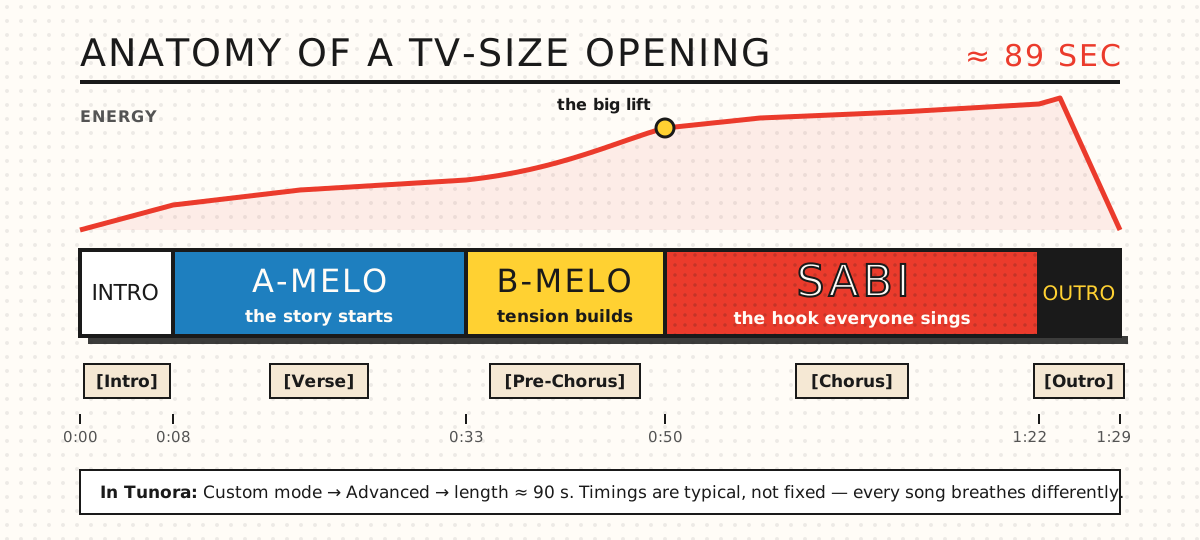
A typical TV-size opening runs about 89 seconds. The Japanese section names map neatly onto Tunora's structure tags.
1. The 89-second TV size
Anime openings air in a "TV size" edit that runs roughly 1 minute 29 seconds to 1 minute 30 seconds, because that is the slot left in a half-hour broadcast. The full single released later is usually closer to four minutes. If you want something that feels like a real opening sequence, set your song length to about 90 seconds rather than letting the AI write a radio-length track.
2. A-melo, B-melo, sabi
Japanese songwriting describes a song in three parts: the A-melo (the verse), the B-melo (a build-up section, like a pre-chorus) and the sabi (the chorus and emotional peak). TV-size openings compress this into one pass: a short instrumental intro, one A-melo, one B-melo, one huge sabi, and a quick ending hit. That maps directly onto [Intro], [Verse], [Pre-Chorus], [Chorus] and [Outro] in Tunora's lyric box.
3. Speed and density
Many shonen openings run fast, often well above 150 BPM, with busy drums and guitar riffs that never fully rest. Naming a tempo in your style prompt ("170 BPM") is one of the most reliable ways to push the AI away from a mid-tempo pop feel.
4. The big lift into the chorus
Openings usually save their biggest moment for the sabi: a drum fill, a pause, sometimes a key change. You cannot force a precise key change with a prompt, but words like "explosive chorus," "anthemic," "triumphant brass hits" and "key change before the final chorus" nudge the arrangement in the right direction.
5. Genre mashups
Rock with orchestral strings. EDM with a J-pop vocal. Ska horns over punk drums. Anime openings rarely stay in one lane, which is why the V6 Wild model is worth a try once you have a draft you like on V6.
Step-by-Step: Make Your First Anime Opening in Tunora
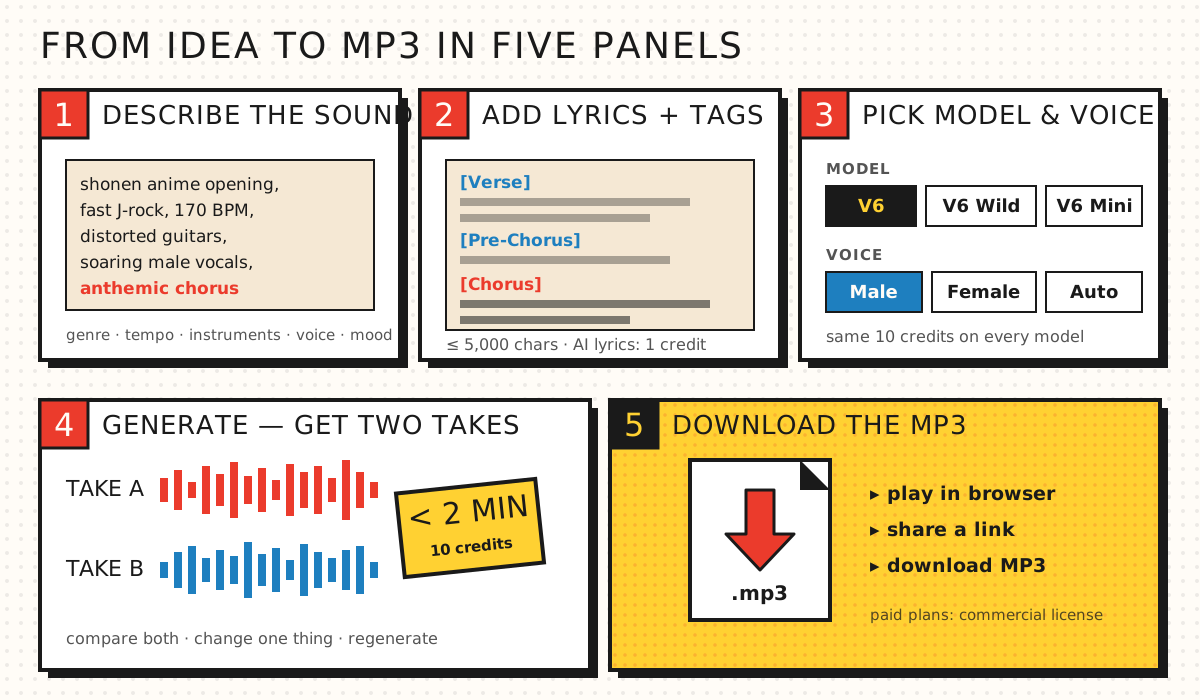
From idea to MP3 in five panels. The whole loop usually takes a few minutes.
Step 1: Create a free account
Go to tunora.io and sign up. New accounts receive 10 free credits once, which is enough for one generation (two songs). No credit card is needed, although the free tier is not available in every region.
Step 2: Choose Simple or Custom mode
Simple mode takes a single description of up to 500 characters, for example: "An energetic shonen anime opening about a pirate crew chasing a legendary treasure, fast J-rock, male vocals." The AI writes the lyrics, title and arrangement for you. It is the fastest way to hear what the engine can do.
Custom mode is where anime openings really come together. You get a lyric box (up to 5,000 characters), a separate style box, a singer choice (male, female or auto), an instrumental switch, an option to exclude styles you don't want, and an Advanced section where you can set the length anywhere from 10 seconds to 6 minutes.
Step 3: Write or generate the lyrics
Paste your own lyrics with structure tags on their own lines (there's a full template below). If you are stuck, press Write lyrics with AI: it costs 1 credit and gives you two drafts to edit. Treat those drafts as a starting point. Swapping in your crew's name, your campaign's villain or your OC's catchphrase is what makes the song feel personal.
Step 4: Describe the sound
This is the step that separates generic from great. A strong style prompt names five things: genre, tempo, instruments, vocal type and mood. For example:
Shonen anime opening, fast J-rock, 170 BPM, distorted guitars,
punchy drums, soaring male vocals, triumphant brass hits,
explosive anthemic chorus
Tunora treats tags and style words as guidance, not strict rules, so stack several reinforcing words rather than one vague one.
Step 5: Set the length and generate
Open Advanced, set the length to about 90 seconds for a TV-size cut (or leave it on auto for a full-length version), choose V6, and hit generate. The first preview usually starts playing within 20 to 30 seconds, and both versions are typically finished in under two minutes. If a generation fails, the credits are refunded automatically.
Step 6: Compare, regenerate, download
Listen to both takes all the way through; the stronger chorus is often in the version you liked less in the first ten seconds. If neither lands, adjust one thing at a time (tempo, vocal type or one line of lyrics) and regenerate. When you are happy, play it in the browser, share the link, or download the MP3.
8 Style Prompts for Anime-Flavored Songs
Copy these into the style box and change the details. None of them name real artists or existing songs, which keeps the output original and within Tunora's rules.
| Use | Style prompt |
|---|---|
| Shonen opening | Shonen anime opening, fast J-rock, 170 BPM, distorted guitars, punchy drums, soaring male vocals, explosive anthemic chorus |
| Pirate adventure theme | Adventurous pirate crew anthem, sea shanty meets pop-punk, accordion and fiddle over power chords, gang vocals, sunny and reckless |
| Melancholy ending | Anime ending theme, mellow city pop ballad, warm electric piano, slap bass, soft female vocals, nostalgic sunset mood |
| Magical-girl opening | Bright magical-girl anime opening, sparkling J-pop, 150 BPM, glockenspiel and synth arps, cute energetic female vocals |
| Villain reveal | Dark villain theme, orchestral rock, low choir, taiko drums, tense staccato strings, menacing and slow-burning |
| Battle BGM (instrumental) | Epic anime battle music, orchestral rock hybrid, 160 BPM, taiko drums, electric guitar lead, rising strings, no vocals |
| Training montage | Upbeat training montage, ska punk with horn section, fast offbeat guitars, gritty shouted chorus, never-give-up energy |
| Fan-game menu (instrumental) | Playful chiptune music for a game menu, bouncy 8-bit melody, steady beat, adventurous and cheerful |
Tip: if an instrumental track keeps sprouting vocal-like sounds, switch to Custom mode and add "vocals, choir, humming" to the exclude-styles field.
Lyric Template: A TV-Size Opening You Can Fill In
Paste this into Custom mode's lyric box, replace the bracketed notes with your own lines, and keep the tags. The line counts are tuned for a roughly 90-second song at a fast tempo.
[Intro]

[Verse]
(Line 1: where the hero starts — small town, empty sea, first step)
(Line 2: the dream that everyone laughs at)
(Line 3: a concrete image — a map, a flag, a promise)
(Line 4: the first sign of the storm ahead)

[Pre-Chorus]
(Line 5: the doubt, said out loud)
(Line 6: the decision — "but I won't stop now")

[Chorus]
(Line 7: the title line — short, shoutable, 3 to 5 words)
(Line 8: the goal, stated as big as possible)
(Line 9: the crew / friends / "we" line)
(Line 10: the title line again, louder)

[Outro]
(One final shout or the title, one more time)
Three habits make AI-sung lyrics land better. Keep lines short, because long lines get crammed and lose rhythm. Repeat the title line in the chorus, because the hook is what people remember. And if a name keeps getting mispronounced, spell it phonetically (Tunora's own guidance suggests the same trick for personalized songs).
About other languages: Tunora accepts lyrics in any language, but pronunciation is strongest in widely spoken languages. If you want Japanese lines in your opening (a classic move for a "real OP" feel), test a short verse first, or mix a Japanese chorus hook into mostly English lyrics and compare the takes.
Six Things Anime Fans Can Actually Make
Openings are the fun headline, but the same workflow covers a lot of fandom projects:
- A theme for your crew or server. Write the opening your Discord, guild or friend group never had. Put everyone's nickname in the verse.
- Character songs for your OCs. Anime character songs ("image songs") are a whole tradition. Give your original character a theme that matches their personality, from a cheerful idol-pop number to a brooding villain ballad.
- Tabletop campaign music. An opening for session zero, a battle loop for boss fights, a quiet ending theme for the tavern. The instrumental generator handles background tracks.
- Fan games and visual novels. Menu music, level themes, chiptune jingles. Original tracks mean you are not borrowing someone else's soundtrack.
- Stream intros and "starting soon" screens. A 30-second hype intro in your channel's style, set with the Advanced length control.
- Birthday songs for the weeb in your life. A personalized song in anime-opening style, with their name in the chorus, is a gift that actually gets replayed.
And yes, if you keep a long OnePieceDle streak going, nobody can stop you from writing yourself a victory anthem about it.
Tunora Pricing: What You Get Free vs Paid
Tunora runs on credits. One generation costs 10 credits and returns two songs; the lyrics generator costs 1 credit per run. Here is how the plans compare at the time of writing (check the pricing page for current numbers):
| Plan | Price | Credits | Approx. songs | Highlights |
|---|---|---|---|---|
| Free | $0 | 10 (one time) | 2 | All models, MP3 downloads, personal use only, songs are public |
| Basic | $9.99/mo | 800/mo | ~160 | Commercial license, private songs, 2 generations at a time |
| Pro | $29.99/mo | 3,300/mo | ~660 | Commercial license, private songs, 4 generations at a time |
| Premier | $59.99/mo | 7,900/mo | ~1,580 | Commercial license, private songs, 6 generations at a time |
A few details worth knowing before you pay:
- Yearly billing gives you 12 months for the price of 10, with credits still delivered monthly.
- One-time credit packs (from $9.99 for 450 credits) last a year and suit occasional creators, but songs made with pack credits alone are for personal use. Commercial use requires an active plan when the song is created.
- Subscription credits do not roll over month to month; pack credits do last the full year.
- Storage: songs without a subscription are kept for 30 days (90 days for pack songs), so download anything you want to keep.
- Refunds are available if you contact support within 7 days of your first subscription.
For a one-off birthday song or a crew theme, the free credits plus a starter pack are plenty. If you are scoring a fan game or uploading monetized videos, a paid plan is what gives you the commercial license.
The Rules: Copyright, Real Artists and Fan Songs
AI makes it easy to create music; it does not make every use of that music automatically fine. Keep these rules in mind:
- Do not paste lyrics from existing anime songs. Official opening lyrics are copyrighted. Write your own, or start from the AI lyrics generator and rewrite.
- Do not ask it to imitate a real singer or band. Tunora's commercial license explicitly forbids imitating a real artist's voice or name, or claiming a real artist performed your song. Describe the sound ("raspy male rock vocals") instead of naming a person.
- Free-plan songs are personal use. Monetized YouTube videos, games you sell and streaming releases need a song created on a paid plan.
- Be careful with series names in anything you sell. A song that mentions a famous character is fine as a personal fan tribute, but if you plan to release or monetize it, keep the lyrics original and leave out trademarked character and series names.
- AI music and copyright registration are unsettled. Tunora's license notes that in some countries, including the US, fully AI-generated music may not qualify for copyright protection. You get usage rights, not a guarantee you can register the song.
- Credit is optional. No attribution is required, though a "Made with Tunora" line is appreciated.
Honest Limitations
No tool is perfect, and it helps to know where this one gets frustrating:
- The free tier is small. Ten credits is one generation. It is enough to judge the quality, not to iterate on an opening for an afternoon.
- No line-by-line editing yet. You cannot fix a single bad word in a finished song; you change the lyrics and regenerate. Extend, cover, remix and stem-splitting tools are listed as coming soon.
- MP3 only, for now. WAV files and separate stems for paid plans are announced but not live, which matters if you want to mix the track yourself.
- Prompts are guidance, not commands. Structure tags and style words steer the arrangement, but you will sometimes get a chorus that arrives early or a tempo that drifts. Regenerating with one change is usually faster than fighting it.
- Free songs are public. Anything you make on the free plan can appear on the Explore page. Private songs need a paid plan.
FAQ
Can AI make an anime opening song?
Yes. AI music generators like Tunora can compose, sing and produce a complete anime-style opening from a text description or your own lyrics. The result sounds most authentic when you specify the conventions anime openings share: a fast tempo, a verse → pre-chorus → chorus structure, an anthemic chorus and a length of about 90 seconds.
How long is an anime opening?
The TV-size version of an anime opening usually runs about 89 to 90 seconds, which fits the opening slot of a half-hour episode. The full-length single is typically around four minutes. In Tunora you can set the length manually in Custom mode's Advanced section.
Is Tunora free to use?
Tunora gives new accounts 10 free credits once, with no credit card required. That covers one generation, which produces two songs. Free songs are for personal use and are public; paid plans start at $9.99 per month and add a commercial license and private songs.
Can I use Tunora songs on YouTube?
Songs created while you are on a paid Tunora plan come with a commercial license that covers monetized YouTube, TikTok and Instagram videos, games, apps and streaming releases. Songs made with free credits are limited to personal, non-commercial use.
Can Tunora sing in Japanese?
Tunora accepts lyrics in any language, and its pronunciation is strongest in widely spoken languages. For Japanese, test a short section first. Many creators get good results by keeping most lyrics in English and using a short Japanese hook in the chorus.
Ready to write the opening your crew deserves? Try Tunora's AI music generator with the template above, then come back and test your One Piece knowledge in today's OnePieceDle.
Put it into practice
A new mystery One Piece character drops every day at 00:00 UTC — six modes, free, no sign-up.
Play today's OnePieceDle